Hello!
Since the last update PT4 crashes a lot, every time that i click on stop getting hands, the program crash. Also i have problems with the HUD, it appears when it want on differents lobbys, and doesnt appear on expressos of winamax. The most important for me is the crash when i stop the getting hands. Hud is secondary for me. Any help for that?

Crashes since last update 4.18.3
Moderators: WhiteRider, kraada, Flag_Hippo, morny, Moderators
9 posts
• Page 1 of 1
Crashes since last update 4.18.3
 by Ernesto_63 » Fri Oct 04, 2024 3:19 am
- Ernesto_63
- Posts: 5
- Joined: Thu Dec 10, 2020 5:07 am
Re: Crashes since last update 4.18.3
by Ernesto_63 » Fri Oct 04, 2024 3:56 am
https://i.gyazo.com/ede6db600ca3dc9248e ... 6cf044.png
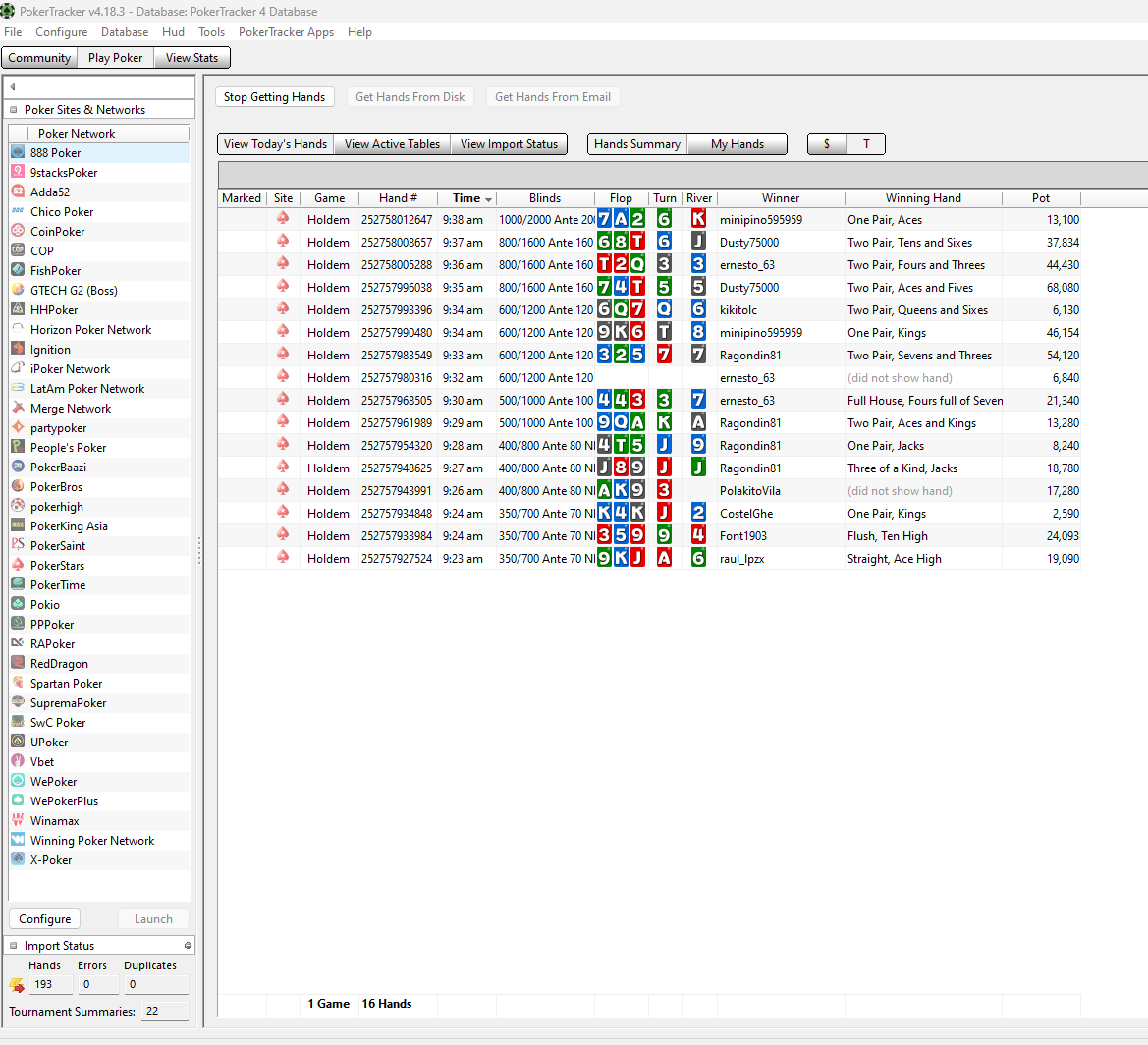
Now look, im playing expressos on wina and a tournament on PS. You can see that pt4 get 193 hands but it only appears 16 hands of PS. I cant see the graph of wina. Yesterday i can see it. I cant understand this
Now look, im playing expressos on wina and a tournament on PS. You can see that pt4 get 193 hands but it only appears 16 hands of PS. I cant see the graph of wina. Yesterday i can see it. I cant understand this
- Ernesto_63
- Posts: 5
- Joined: Thu Dec 10, 2020 5:07 am
Re: Crashes since last update 4.18.3
by Flag_Hippo » Fri Oct 04, 2024 5:45 am
So we can see what's going on here and advise you accordingly please turn on 'Enable Logging' in PokerTracker 4 via 'Configure -> Options' and then restart PokerTracker 4. Next reproduce the crash and then attach your log file to a Support Ticket:
C:\Users\{Windows Login}\AppData\Local\PokerTracker 4\Logs\PokerTracker4.log
To access the log file open File Explorer in Windows and enter the following in the address bar:
%localappdata%\PokerTracker 4\Logs
The file we need will be the text file called 'PokerTracker4' or 'PokerTracker4.log' that is in that folder. One thing to note is that every time you close/restart PokerTracker 4 it will begin a new log so you will need to save/send that PokerTracker4.log file before restarting PokerTracker 4 again.
C:\Users\{Windows Login}\AppData\Local\PokerTracker 4\Logs\PokerTracker4.log
To access the log file open File Explorer in Windows and enter the following in the address bar:
%localappdata%\PokerTracker 4\Logs
The file we need will be the text file called 'PokerTracker4' or 'PokerTracker4.log' that is in that folder. One thing to note is that every time you close/restart PokerTracker 4 it will begin a new log so you will need to save/send that PokerTracker4.log file before restarting PokerTracker 4 again.
- Flag_Hippo
- Moderator
- Posts: 17089
- Joined: Tue Jan 31, 2012 7:50 am
Re: Crashes since last update 4.18.3
by semflyy » Sat Oct 12, 2024 8:00 pm
I'm experiencing the same problem. Did you find any solutions for it? thanks
- semflyy
- Posts: 2
- Joined: Wed Apr 11, 2018 10:57 am
Re: Crashes since last update 4.18.3
by Ventilatorrr » Sun Oct 13, 2024 6:14 am
We are still investigation the issue. Please send us the logs following Flag_Hippo's post from above.
- Ventilatorrr
- Moderator
- Posts: 116
- Joined: Sun Jul 19, 2015 12:39 pm
Re: Crashes since last update 4.18.3
by semflyy » Mon Oct 14, 2024 9:10 pm
Ventilatorrr wrote:We are still investigation the issue. Please send us the logs following Flag_Hippo's post from above.
I can't even send a support ticket because it puts this : "please correct the file upload error and try again"
- semflyy
- Posts: 2
- Joined: Wed Apr 11, 2018 10:57 am
Re: Crashes since last update 4.18.3
by Flag_Hippo » Tue Oct 15, 2024 6:43 am
Please zip/compress the log file and then try attaching it again:
Guide: Attaching Files
If that doesn't resolve the error then instead of attaching please upload the log file to the cloud (e.g. Dropbox, Google Drive, OneDrive e.t.c.) and include the link in the ticket so we can download it.
Guide: Attaching Files
If that doesn't resolve the error then instead of attaching please upload the log file to the cloud (e.g. Dropbox, Google Drive, OneDrive e.t.c.) and include the link in the ticket so we can download it.
- Flag_Hippo
- Moderator
- Posts: 17089
- Joined: Tue Jan 31, 2012 7:50 am
Re: Crashes since last update 4.18.3
by juanchi » Fri Oct 18, 2024 7:01 pm
I'm having the same issue, but in my case it's in the middle of the session while I'm playing and not when I click "Stop getting hands". For this eason I cannot send a log file, because I don't know when is going to happen. I play on ipoker room (Champion poker).
- juanchi
- Posts: 5
- Joined: Thu Sep 03, 2009 6:25 pm
Re: Crashes since last update 4.18.3
by Flag_Hippo » Sat Oct 19, 2024 6:21 am
juanchi wrote:I'm having the same issue, but in my case it's in the middle of the session while I'm playing and not when I click "Stop getting hands". For this eason I cannot send a log file, because I don't know when is going to happen. I play on ipoker room (Champion poker).
As long as logging has been turned on you can grab the log file after the crash happens and send it to us with the steps posted above:
Flag_Hippo wrote:So we can see what's going on here and advise you accordingly please turn on 'Enable Logging' in PokerTracker 4 via 'Configure -> Options' and then restart PokerTracker 4. Next reproduce the crash and then attach your log file to a Support Ticket:
C:\Users\{Windows Login}\AppData\Local\PokerTracker 4\Logs\PokerTracker4.log
To access the log file open File Explorer in Windows and enter the following in the address bar:
%localappdata%\PokerTracker 4\Logs
The file we need will be the text file called 'PokerTracker4' or 'PokerTracker4.log' that is in that folder. One thing to note is that every time you close/restart PokerTracker 4 it will begin a new log so you will need to save/send that PokerTracker4.log file before restarting PokerTracker 4 again.
- Flag_Hippo
- Moderator
- Posts: 17089
- Joined: Tue Jan 31, 2012 7:50 am
9 posts
• Page 1 of 1
Who is online
Users browsing this forum: No registered users and 0 guests